
Architecture
This chapter describes how Campfire is put together. The people and systems around it are in Context; this chapter starts at that boundary and works inward, from the applications to the modules to the layers inside one.
| Page | What it covers |
|---|---|
| Code organization | How the code is divided, and the rule that keeps modules apart |
| Applications | The web application, the two shells that host it, and the one origin |
| Modules | What each feature module and library owns |
| Layers | Domain, data, and presentation, and the navigation and bridge across them |
| Example flows | Signing in, and a leader's unit – the layers working together |
Containers
Campfire is one web application, used in a browser and hosted on a phone by an Apple shell and an Android shell. The application is composed from feature modules, and the modules talk to back-end services that live outside the boundary. Applications describes the three apps and how the shells host the web, Modules what each module owns, and Environments where each of them runs and what answers behind the one origin they share.
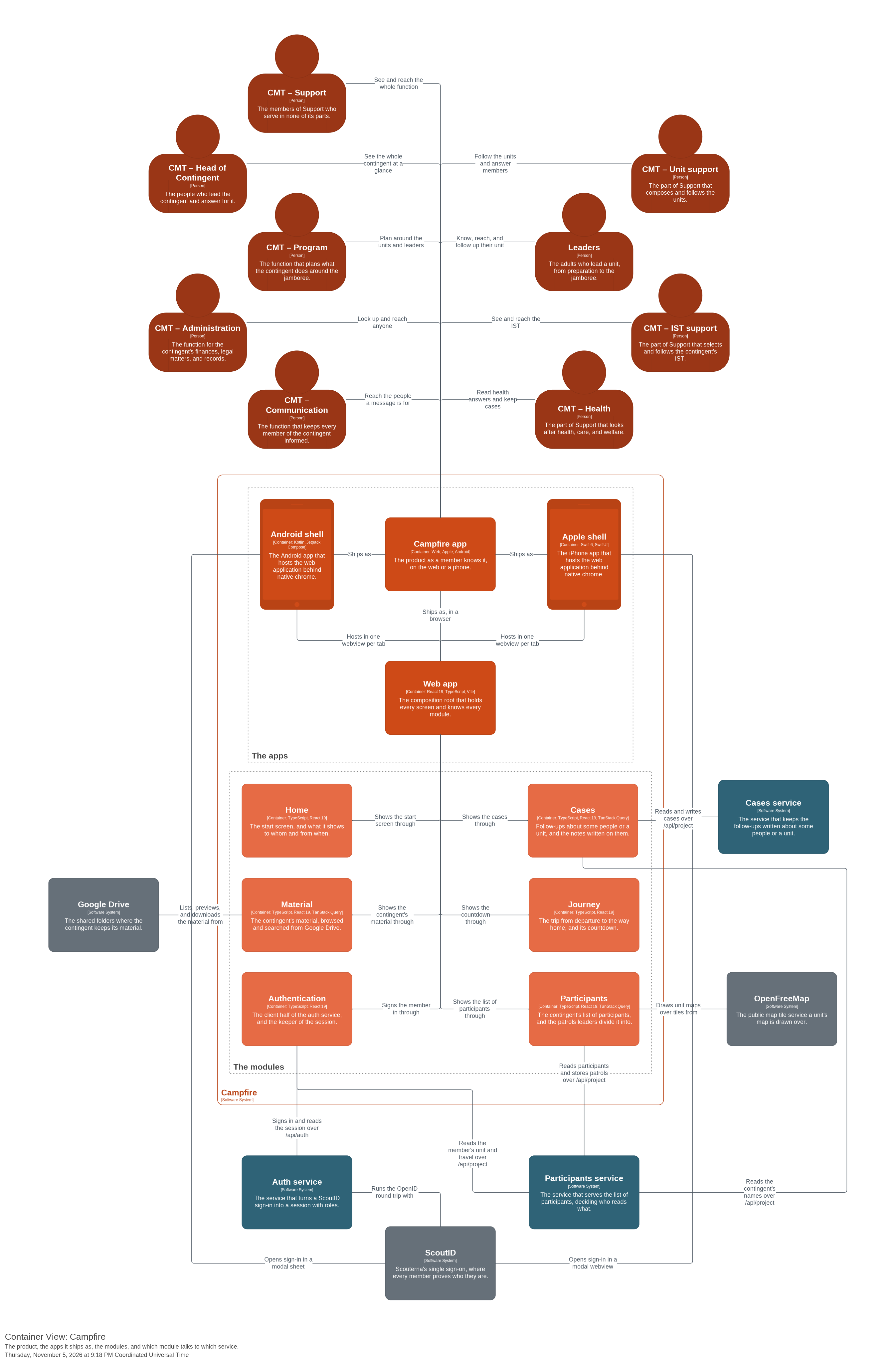
The diagram leaves out two kinds of container the model holds. The libraries are reached by nearly every other container, so drawing them adds a fan of arrows and no fact about the product's shape. The mock back-end stands in for the back-end services on a developer's machine, but it is a developer tool and never a dependency of anything shipped.
What the model draws
Every diagram is rendered from one C4 model written in Structurizr DSL, so the diagrams cannot disagree with each other (ADR 030). The model has a system context view, a container view, and a deployment view per environment.
Each app, module, and library is a container of its own rather than a component inside one front-end box. That is what they are – separately bounded packages the web application assembles at build time – and drawing them that way keeps the module rule visible, along with each module's edge to the service it talks to. The back-end services are drawn as software systems of their own, because they are built and run outside this repository.
The model stops at containers. What a container is made of is described in prose under Layers and checked against the code rather than against a picture. The data model is not written down either: the wire shapes belong to the services, and the domain shapes to the module that reads them, so a third copy here would only go stale.